This past question is created to help students better understand the format and expectations of the Word Processing exam. You can review the questions directly on this page and download the PDF version after verifying your subscription to our YouTube channel. The downloadable version does not contain answers.
SECTION A: Answer All the Questions
1. Compare and contrast word art and clip arts.
Word Art refers to decorative text effects, while Clip Art refers to pre-made images or graphics available in a library.
2. Explain how to protect your document with password.
Go to File > Info > Protect Document > Encrypt with Password. Enter a password and confirm to protect the document.
3. Explain page orientation and state the default orientation.
Page orientation is the direction in which a document is displayed or printed. The default is Portrait.
4. Explain the red and/or green lines that appear under certain words in Word Processing.
Red lines indicate spelling errors; green lines indicate grammatical issues.
5. Explain the summation formula with reference to MS Word tables.
Use formulas like =SUM(ABOVE) in table cells to calculate totals from the rows above.
6. Explain the uses of water marks.
Watermarks are used to indicate document status (e.g., Confidential, Draft) or branding.
7. List five (5) keyboard shortcut key for navigation in MS Word.
Ctrl + Arrow keys, Ctrl + Home, Ctrl + End, Page Up, Page Down.
8. List five (5) types of charts in MS Word.
Bar, Line, Pie, Area, Column charts.
9. List four (4) categories of commands under the home ribbon.
Clipboard, Font, Paragraph, Styles.
10. List four (4) categories of commands under the page layout ribbon.
Themes, Page Setup, Page Background, Paragraph.
SECTION B – PRACTICAL
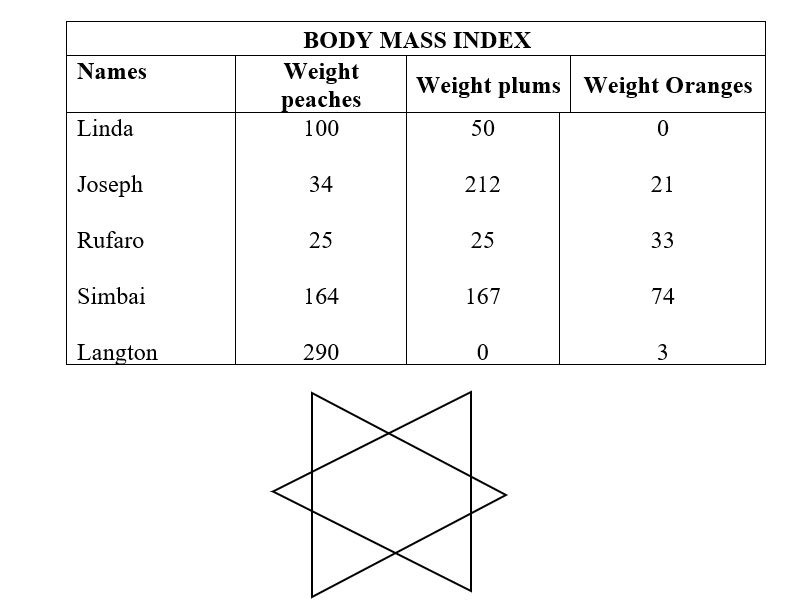
- Insert the table and the plain figure below it.
- Use font size 14 and bold, and center all the headings.
- Align all the figures to the right.
- Save the work as KITE and print your work.