Objectives:
SECTION A
Answer all the questions.
- Briefly describe MS Macros with practical examples.
- Briefly explain the importance of the page setup in printing a worksheet.
- Briefly explain the term filtering in MS Excel.
- Briefly explain the term smart tags.
- Differentiate between grid lines and border lines.
- Differentiate between the formulas ROUND and TRUNC.
- Explain the components of a nested if statement.
- Explain the term autofill.
- Explain the difference between locking a cell and locking a workbook.
- Explain the term autosum.
SECTION B
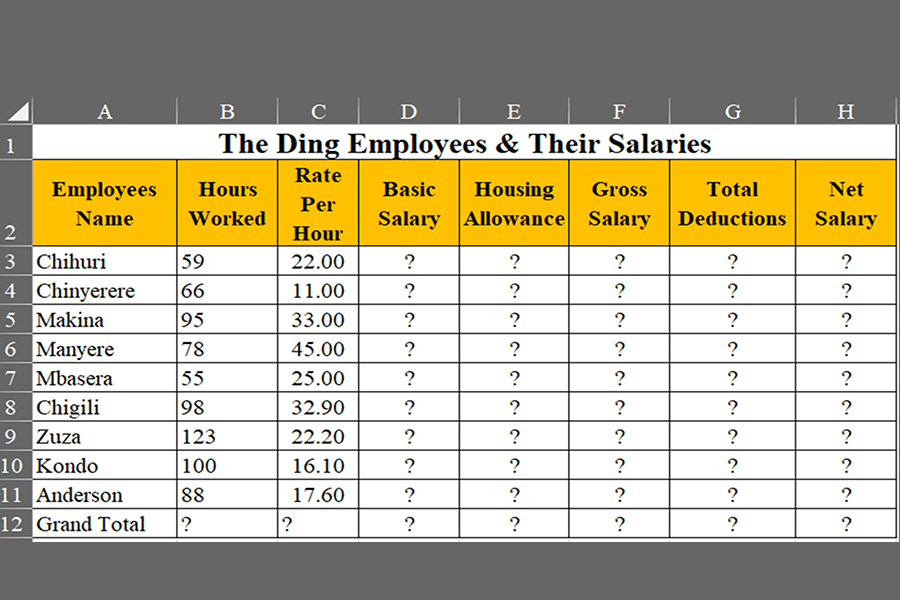
Create the following worksheet just like the image shown above, in landscape format
Instructions
- Given Basic Salary as the products of hours worked and Rate Per Hour, calculate the
Basic Salary of the Employees. - Given Housing Allowance as 15% of basic salary, calculate the Housing Allowance
of the Employees - Given Transport Allowance as 10% of Basic Salary, calculate the Transport Allowance
of the Employee. - Given Gross Salary as the sum of Basic Salary and the Allowances, calculate the Gross
Salary of the Employees. - Given Total Deductions as 13% of Gross Salary, calculate the
Total Deductions of the Employees. - Calculate the Net Salary
- Calculate the Grand Total of all the above components
- Format all the money columns as a currency with two (2) decimal places
- Bold the heading with 20 font size and make the rest of the work 14 regular font size
- Save your work with your index number and name
- Print your work











