
Introduction
Welcome to Armstrong Computers College’s learning hub! 🎓 We are excited to present the November/December 2023 Level 3 Database Management Past Questions and Solutions. This blog is designed to help students understand how exam questions are structured and to develop a deeper understanding of database management systems.
Our goal is to equip students with the knowledge and confidence needed to excel in their exams. With each question provided below, simply click on it to reveal the answers and learn more. Additionally, we’ve included a downloadable resource for offline practice.
Why Use This Resource?
Here’s why this resource is essential for your preparation
- Understand Question StructureGain insights into how questions are framed and what examiners expect in responses.
- Comprehensive Solutions Each question comes with detailed answers to guide your study process.
- Database Management MasteryBuild a strong foundation in database management system concepts and practical applications.
- Downloadable ResourceAccess and download the complete question set for convenience and continuous learning.
How to Use This Resource
- Step 1 Click on any question to view its detailed answer.
- Step 2 Review and analyze the solutions to enhance your understanding.
- Step 3 Download the full past question set using the link provided below.
- Step 4 Practice and revisit the questions as often as needed.
SECTION A
Answer all the questions.
Memo: Stores larger text blocks, up to 65,536 characters, used for detailed descriptions or comments.
Example:
Double salary = 4567.89;
Double temperature = -12.34;
2. Using the "Compact and Repair" tool from the Database Tools tab.
2. Number
2. Action Query
3. Parameter Query
4. Crosstab Query
Rows: Horizontal arrangements of data in a table.
Primary Key: Uniquely identifies each record in a table.
Comparison: Both are essential for relational databases; Foreign Keys create relationships, while Primary Keys ensure uniqueness.
2. Multi-field index
SECTION B (50 MARKS)
PRACTICAL – COMPULSORY
- ✍️1. Design a database called EXAMINATION
- ✍️2. Create the four (4) tables below and save them as GENDER, HALLS, GRADING and STUDENTS.
- ✍️3. Create a lookup table for both GENDER AND HALL columns in the STUDENTS table and link it with its respective tables.
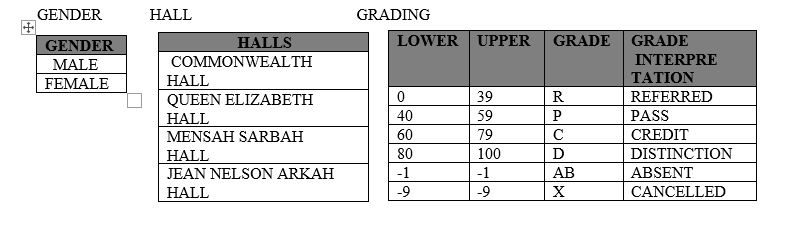
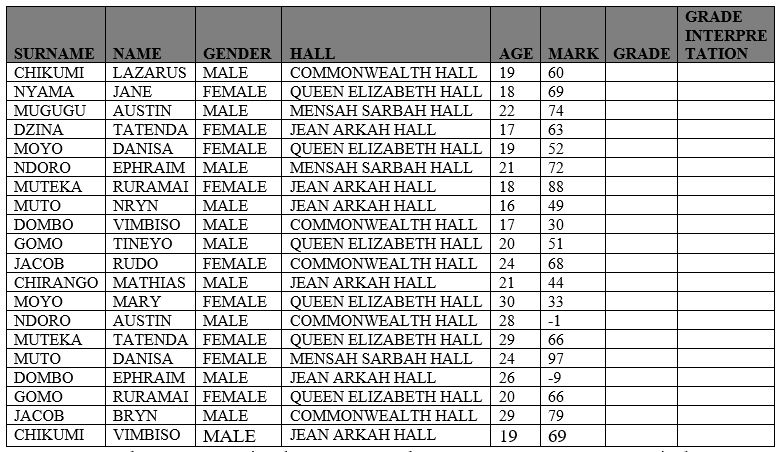
✍️4. Use update query to assign the GRADES and GRADE INTERPRETATIONS in the STUDENTS table using the grading system in the GRADING table
✍️5. Print all the four tables. Print the STUDENTS table in Landscape orientation.
Let's look at how to do that practically
📥 Download Full Question Set
Click here to download the November/December 2023 Level 3 Database Management Past Questions and practice offline!
Stay ahead of your exams by practicing these questions and understanding their solutions. Don’t forget to share this resource with your peers and help spread the knowledge!
Let me know if you'd like any additional edits or enhancements!











